Modern software architecture has evolved from dedicated host machines to virtual machines (VMs), and now to using container technology. This latest step in the evolution has been around for under a decade but has become ubiquitous in the industry. But what is it about container technology that is so game-changing?
Pre-Docker history
When creating applications, it is initially unclear how much computational power is required for running software. This can be due to multiple unknowns, for example, how many active users it will have or which experimental features are going to be successful enough to become fully developed. Historically, this issue was resolved by an operations team purchasing excessive computational power for the host machine, since businesses prioritise availability. This was inefficiently used with each server being used only for one application.
Eventually, VMware introduced VMs which allowed multiple applications to be run on a single server - allowing companies to increase efficiency. VMs emulate entire operating systems within a single host machine. It does this through usage of hypervisors which is a technology that carves out some of the host machine’s hardware resources (such as RAM, CPU & storage) so that a VM is able to behave exactly like an OS. This OS can be chosen and can run applications.
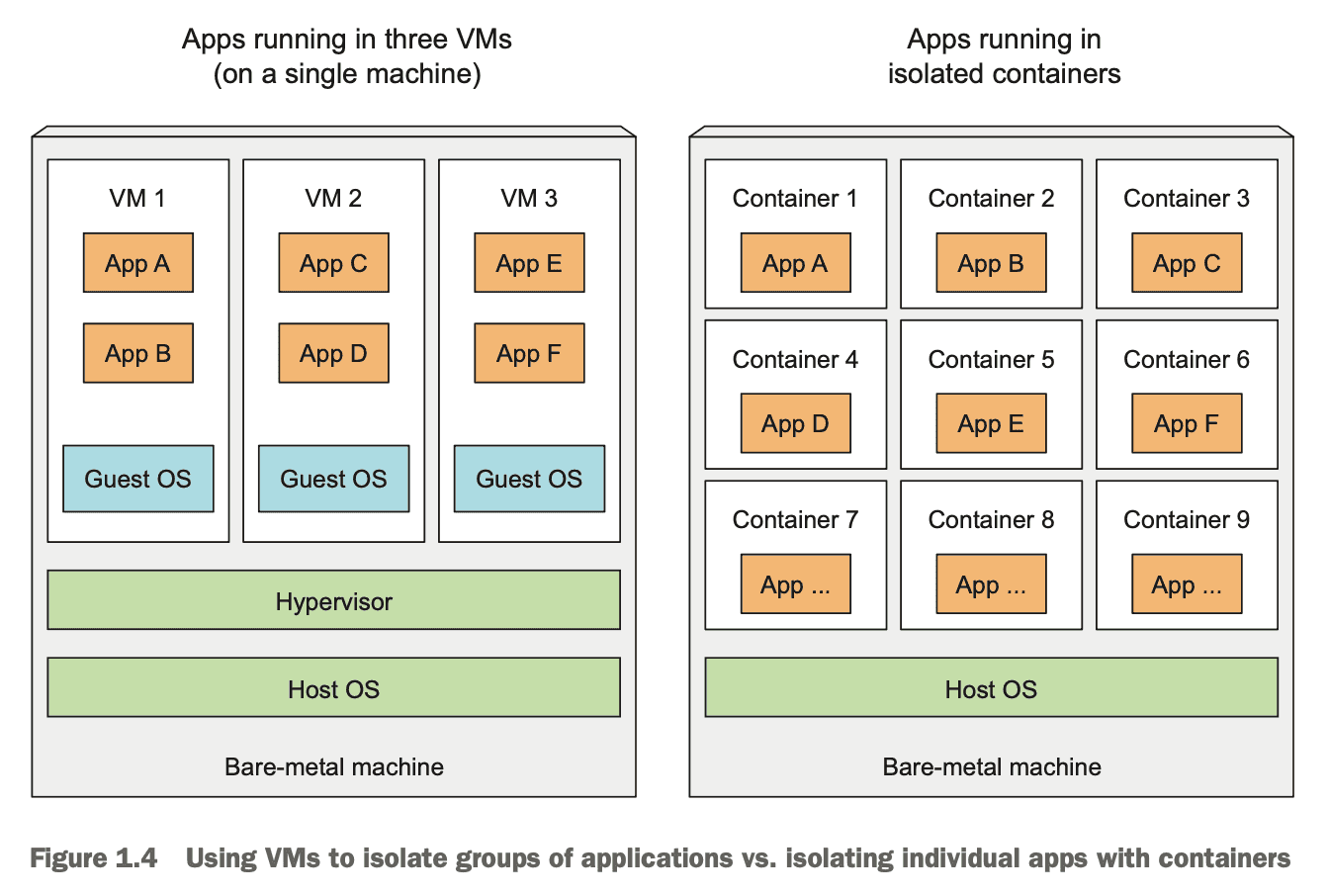 Image from Kubernetes in Action by Manning.
However, each instance of a virtual machine requires a dedicated kernel, for example, Ubuntu. This means that the host machine is sharing more computational resources between multiple virtual machines than desirable due to the demands of a full operating system. Then arrived Docker - which received widespread adoption very quickly.
What makes container technology different and how does it work?
When Docker arrived, it created a paradigm shift where different applications could share the same kernel and run in parallel. Instead of carving out hardware resources and relying on a dedicated hypervisor, Docker uses the operating system’s resources across each of the containers resulting in more efficient resource consumption and quicker application load times - since a kernel doesn’t need to be initialised each time. This has developed alongside the explosion of cloud applications and has led to a significant decrease in costs. But how does it work?
Docker is able to create containers for your application which are able to run anywhere provided that the computer architecture is compatible. It does this by compiling Docker images - which are composed of read-only layers of relevant packages with the newer packages at the top and the oldest at the bottom.
To illustrate this, here is an overly simplified example:
Consider a business that enforces a requirement to use Ubuntu 18.04 for its applications and you want to create a Java application. The bottom layer would be the Ubuntu layer, the layer above would be the JVM and the third level would be your application itself. This structure provides several benefits.
Architecture of Docker
Docker is composed of different components: a daemon (a.k.a. the engine), containerd, runc & shim.
Docker daemon
The Docker daemon is the engine of Docker. By using Docker CLI, the client converts this into an API payload to interact with the Docker daemon’s API endpoints. These are exposed on either local sockets or over a network (in which case, TLS should be asserted as a requirement). When the daemon receives a request to create a container, it will communicate this to containerd (via gRPC). Whilst a lot of its behaviour has been extracted into separate components (mostly into containerd), as of writing this, the daemon is still responsible for higher-level tasks such as image management, REST APIs, security, core networking & orchestration.
containerd
containerd is responsible for the complete container runtime. This delegates the creation of containers to runc. Each time a container creation request is received, containerd will fork a new runc instance for this.
runc
runc packages a Docker image using a provided Dockerfile alongside the application code. These images must abide by the Open Container Initiative (OCI). It interfaces with the operating system’s kernel to aggregate the required constructs for a container (such as namespaces and cgroups). Once the container has been created, the runc instance has served its purpose and exits. This also starts a child process known as shim.
shim
shim replaces runc as the parent of the container once created and is responsible for:
- Keeping input and output streams open - so if the daemon restarts, the containers are not killed by the pipes closing, and
- Informing containerd of the container’s exit status.
This is a summary of how different cogs in Docker interact together during a complete lifecycle. This delves to a lower level of abstraction than is required to use Docker, however, I feel it is important details to know in order to avoid unnecessary black-boxes.